Game music generator
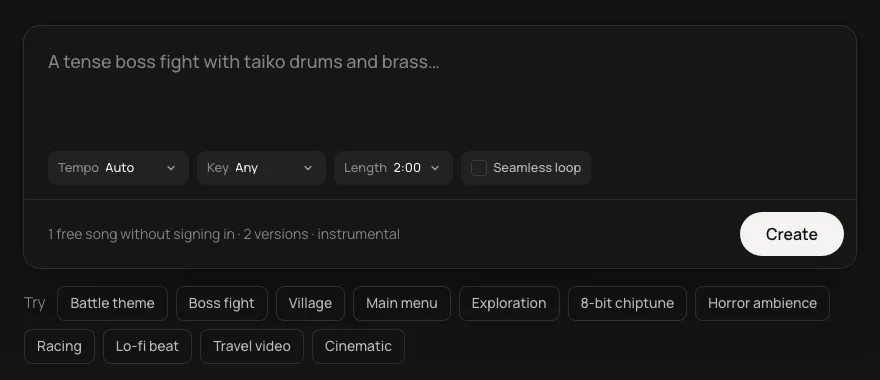
Score your game by describing it. Battle themes, quiet towns, boss fights, menus and seamless loops, instrumental and royalty-free for commercial games.
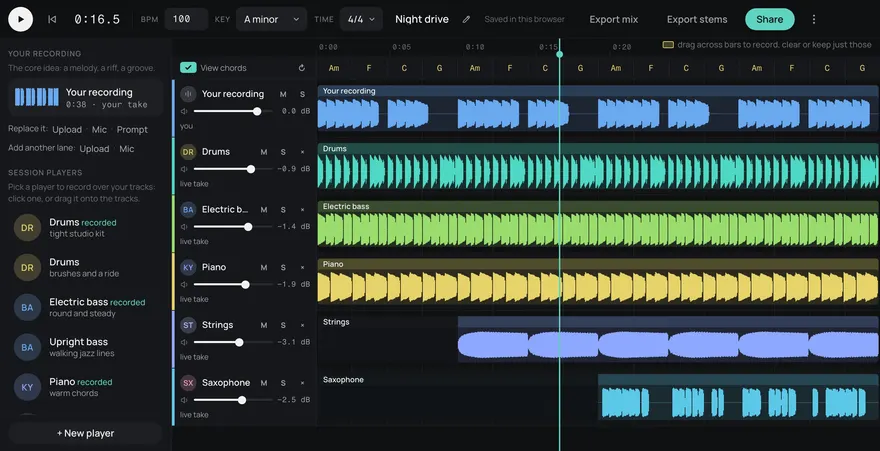
This is an example. Describe your own above and it comes like this too: solo a part, redo one, download them, or edit it in Studio.
Your songs
Songs made here
Made from these words on this page, each with its stems. Move a level, or press M or S, to hear a part on its own.
Town. a warm town theme with acoustic guitar, marimba and soft strings, light and easy to hear many times
Victory sting. a short triumphant victory sting with brass and timpani
How it works
- Describe the scene. Brief it the way you'd brief a composer: "a tense boss fight with taiko drums", "a quiet village at dusk".
- Pick the shape. A tempo that matches the action, a key that sits with the rest of your soundtrack. Seamless loop is on, for music that runs as long as the level; turn it off for a cue or a jingle.
- Get your track. Download a WAV for the build, take its stems, or open it in Studio to change the parts.
A track for every scene
Write the scene the way you'd brief a composer: the place, the pace, the instruments. The generator answers with a track up to two minutes long, and its stems.
- Title and menus: a theme that sets the tone and loops quietly behind the buttons.
- Exploration: open, patient music for fields, forests and space.
- Combat and bosses: drums, brass and urgency, at the tempo you pick.
- Towns and shops: warm, small-ensemble pieces that don't tire on the hundredth visit.
- Victory, game over, credits: short cues and long endings.
Loops that don't click
With Seamless loop on, as it is here, the track is made to repeat: it ends where it begins, in whole bars, so the engine can play it on repeat for as long as the player stays. See the loop generator.
Straight into Unity, Godot or your own engine
Use the generator in the browser, or call the API from your tools and build scripts. The API docs have ready-to-paste code for Unity (C#) and Godot 4 (GDScript), with curl, JavaScript and Python.
Yours to ship
Royalty-free: use it in commercial games and videos. On every plan, Free included. Download an MP3 for prototypes and a WAV for the release build.
Music that follows the player
A level theme plays the whole time someone is in the level, but the level isn't the same the whole time. Players wander, hide, fight and win. Music that changes with them makes the game feel alive.
Every track here comes as five stems (drums, bass, guitar, keys and other). They line up exactly, so you can load them as layers in your engine and fade them in and out on your own rules.
- Calm: keys and other only, quiet under exploration.
- Alert: bring in the bass when an enemy spots the player.
- Combat: add the drums, and the same tune is now a fight.
Because the stems add up to the mix, all five together sound exactly like the full track. Nothing jumps when the layers change.
A soundtrack that holds together
Cues sound like one game when they share a tempo and a key. Pick both for your first track, then set the same ones for the next. A town theme and its battle theme in the same key can cross-fade without a clash, and a victory sting lands on the beat the battle left off on. Leave them on Auto while you're sketching, and fix them once you know the sound of your game.
Change one part, keep the rest
If the drums are too busy for a puzzle room, make the drums again. The bass, guitar, keys and other part stay exactly as they were, so the theme players already know doesn't move. In Daydream Studio you can play the parts live while you decide, then export the stems.
Questions
How do I make short stingers for victory or game over?
Turn Seamless loop off and ask for a short cue: "a short triumphant brass fanfare", "a falling, sad game over sting". Use the tempo and key of the level it follows so it lands cleanly.
Can my build script make the music?
Yes. Call the HTTP API from a build step or an editor tool. The docs have Unity C# and Godot GDScript examples.
Which file should go in the game?
Use the WAV mix or the FLAC stems for the release build, and the MP3 while you prototype.
Can it make music that loops?
Yes. Turn on Seamless loop and the track is made to repeat without a gap or a click.
Does it work with Unity and Godot?
Download MP3 or WAV files and drop them in, or call the API from the editor or a build step. The docs have Unity and Godot examples.
Can I use the music in a commercial game or video?
Yes. Every song is royalty-free on every plan, Free included: use it in commercial games, videos, streams, podcasts and apps.
How much does it cost?
5 songs a month are free with a Daydream account, and 5¢ a song after that, in credit packs from $3 (60 songs). Through the API, every song is 5 credits ($0.05) from a credit pack: the free songs are for this page, Studio, and ChatGPT and Claude. Credits never run out at the end of the month, and any pack is unlimited downloads, WAV and stems. A song is one description, and each comes with its stems.
Can I use it in Claude or ChatGPT?
Yes. Add https://gen.daydream.live/mcp as a custom connector in Claude, or as a custom MCP server in ChatGPT, or add the Daydream app from ChatGPT's directory, and sign in with your Daydream account. Then describe a song in the chat: it plays there with its stems in their own lanes, and if you ask for new drums it makes that part again with the other four as they are. It spends the same credits as this page, 5 a song. How to add it.