Background music generator
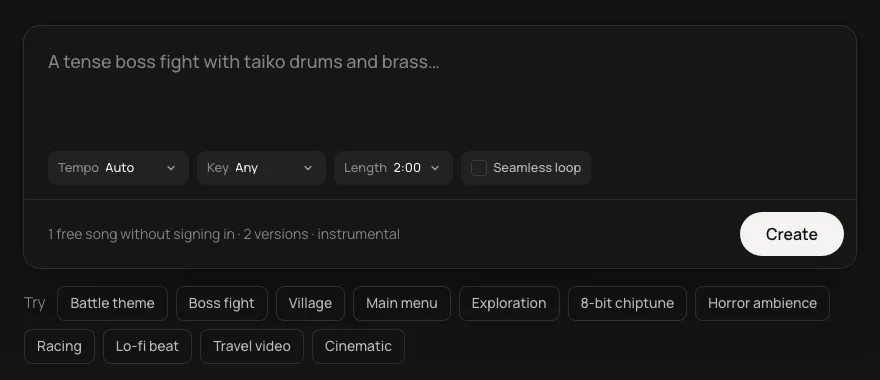
Music that sits under your video, stream or app without getting in the way. Describe the mood and get an instrumental track with its stems, royalty-free.
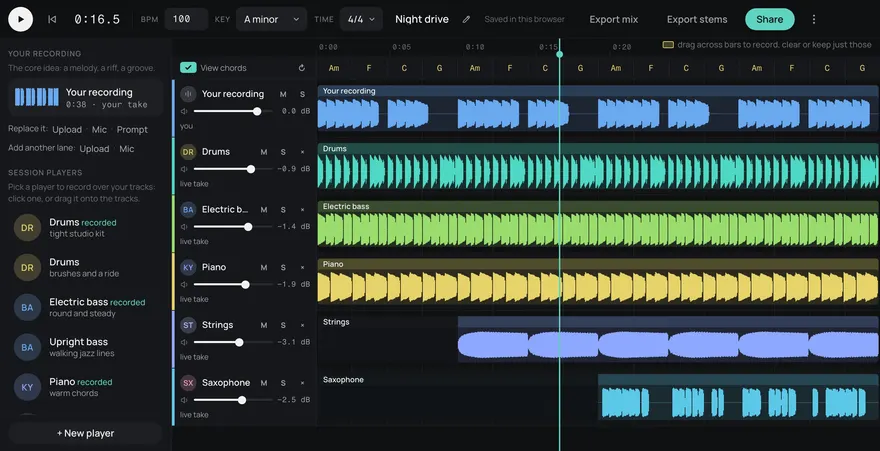
This is an example. Describe your own above and it comes like this too: solo a part, redo one, download them, or edit it in Studio.
Your songs
Songs made here
Made from these words on this page, each with its stems. Move a level, or press M or S, to hear a part on its own.
How it works
- Describe the mood and where it goes. "Calm piano under a podcast intro", "upbeat pop for a product demo".
- Pick a length. Thirty seconds for a short, two minutes for a video, or a seamless loop for a stream screen.
- Drop it under your edit. Download the version you like as an MP3 or a WAV.
Under the voice, not over it
Ask for what background music needs to be: steady, unobtrusive, the right energy. "Soft lo-fi beat for a study vlog", "upbeat corporate pop for a product demo", "calm piano under a podcast intro".
For every kind of video
- YouTube and social: vlogs, tutorials, reviews, shorts.
- Streams: starting soon, be right back, and quiet loops under the game.
- Podcasts: intros, outros and beds.
- Apps and websites: onboarding, ambient loops, product videos.
Clear to use
Royalty-free: use it in commercial games and videos. Make 5 songs a month free, then 5¢ a song, whatever their length.
What makes music sit in the background
Background music works when nobody notices it start. That usually means a steady groove, no sudden drops or big fills, and not much happening in the middle of the range where a voice sits. Put that in the description: "no lead melody", "nothing busy", "soft drums that stay the same all the way through".
Tempo matters too. A slower track, somewhere around 70 to 95 BPM, leaves more room between notes for someone talking. Set the BPM yourself, or leave it on Auto and say "slow" or "relaxed".
Make room for a voice with the stems
Every song comes as five stems (drums, bass, guitar, keys and other). They're made together and lined up, so the mix is exactly their sum. When someone starts talking, mute the parts carrying the melody, usually keys, guitar or other, and keep drums and bass for the pulse. Bring the rest back when the talking stops. Stems are on every plan. More on stems made with the song.
Long edits, streams and apps
- A long edit: turn on Seamless loop and repeat the track as long as the video runs, or make a few two-minute tracks at the same tempo and key so they cut together.
- A stream: loops for starting soon and be right back screens. See music for your stream.
- An app or a website: a quiet loop that can play for minutes without a seam. See the loop generator.
- A podcast: a bed under the first minute of talk. See podcast intro music.
Questions
How loud should background music be under a voice?
Low enough that you can follow every word with your eyes closed. Most editors set it well under the voice and lower it further while someone talks. Muting the melody stems does more than turning the whole mix down.
Can I make several tracks that sound like one series?
Yes. Set the same tempo and key for each one and keep the instruments in the description the same. Change the mood words between them, so each episode or section gets its own track that still sits with the rest.
Which instruments stay out of the way of a voice?
Soft drums, warm bass, pads and gentle piano usually do. Bright lead synths, busy guitar and anything high and loud compete with speech. Ask for what you want, and for what you don't.
Will my video get a copyright claim?
The music is made for you when you ask for it, from your own description, and it's royalty-free for commercial use. It isn't taken from a stock library.
Can I use the music in a commercial game or video?
Yes. Every song is royalty-free on every plan, Free included: use it in commercial games, videos, streams, podcasts and apps.
How much does it cost?
5 songs a month are free with a Daydream account, and 5¢ a song after that, in credit packs from $3 (60 songs). Through the API, every song is 5 credits ($0.05) from a credit pack: the free songs are for this page, Studio, and ChatGPT and Claude. Credits never run out at the end of the month, and any pack is unlimited downloads, WAV and stems. A song is one description, and each comes with its stems.
Can I use it in Claude or ChatGPT?
Yes. Add https://gen.daydream.live/mcp as a custom connector in Claude, or as a custom MCP server in ChatGPT, or add the Daydream app from ChatGPT's directory, and sign in with your Daydream account. Then describe a song in the chat: it plays there with its stems in their own lanes, and if you ask for new drums it makes that part again with the other four as they are. It spends the same credits as this page, 5 a song. How to add it.