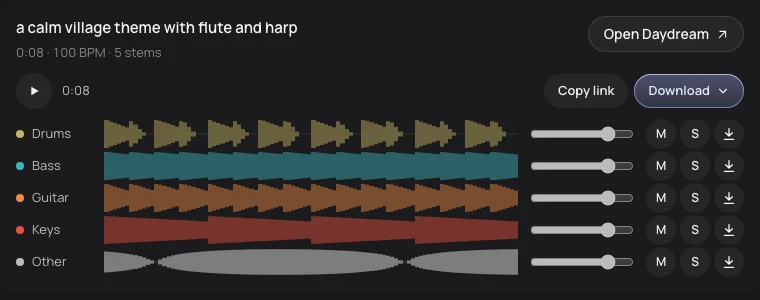
Drums
Bass
Guitar
Keys
Other
For creators
Make your own royalty-free music instead of searching a stock library: describe it, get it, use it in commercial work.
This is an example. Describe your own above and it comes like this too: solo a part, redo one, download them, or edit it in Studio.
Made from these words on this page, each with its stems. Move a level, or press M or S, to hear a part on its own.
Royalty-free: use it in commercial games and videos. No per-use fees and no royalties, on every plan, Free included. Make the track, download it, put it in your project.
Stock libraries make you search for something close enough. Here you describe exactly what you need: the genre, the instruments, the tempo, the key, a loop. If the first one isn't it, make another or describe it again.
5 free songs your first week, then 2 every week, then 5¢ a song after that, in credit packs from $3 (60 songs). The API is pay as you go: 5¢ a song from the same credit packs, with no subscription. See pricing.
Every song is royalty-free and cleared for commercial use on every plan, Free included. That covers:
You don't pay per view, per play or per copy, and there's no licence to renew for each project.
A stock track is one file that many other videos can use too. Here the song is made when you ask for it, from your own description. If you need a second track in the same style for the same project, set the same tempo and key and describe it the same way with one change: "the same, but slower and with no drums".
The licence is the same for every style, so the choice comes down to what the video is doing. Music that fights the picture or the voice is the usual reason a background track feels wrong. Pairings that tend to work:
Narrated videos are where the stems help most. Export the stems and turn the keys and other down while someone speaks, so the beat keeps the pace and the melody stays out of the way. More pairings for spots and promos are on music for ads.
No. Royalty-free means you pay nothing per use once you have the track. Here five songs your first week, then two every week, are also free with a Daydream account, and after that a song is 5¢ from credit packs. Either way it's cleared for commercial use.
Yes. Commercial use includes client work on every plan, so the track can go in the film, ad or video you deliver.
No. Songs made with free songs and songs made with bought credits are royalty-free for commercial use in the same way.
Yes. Every song is royalty-free on every plan, Free included: use it in commercial games, videos, streams, podcasts and apps.
With a Daydream account, 5 free songs your first week, then 2 every week, free; 5¢ a song after that, in credit packs from $3 (60 songs). The API is pay as you go: 5¢ a song from the same credit packs, with no subscription. Credits never run out at the end of the month, and any pack is unlimited downloads, WAV and stems. A song is one description, and each comes with its stems.
Yes. Add https://gen.daydream.live/mcp to Claude or ChatGPT (or the Daydream app in ChatGPT) and describe a song in the chat: it plays there with its stems. How to add it.
Updated